
Hey students, the main aim of this article to guide How to Correct SSC CHSL 2026 Application Form. We all know that the Staff Selection Commission (SSC) will open the SSC CHSL 2026 Application Form Correction Window on 14 October 2026. Candidates who have submitted their Combined Higher Secondary Level (CHSL) Examination 2026 application form and made mistakes in their details will be able to correct the permitted information during the correction period.
To guide students, this article explains how to correct the SSC CHSL 2026 application form, including the login process with visual image, correction steps with graphics, and important instructions for candidates.
Candidates should note that there will be no separate direct link for SSC CHSL Application Form Correction. They must visit the official SSC website, log in using their Registration Number and Password, and access the correction facility from their account. Bookmark this page for the update of the ssc chsl correction window update. We also cover the details information about the city intimation, you can visit on that article for the city intimation all update.
SSC CHSL 2026 Application Form Correction: Overview
| Details | Information |
|---|---|
| Exam Name | SSC CHSL Examination 2026 |
| Conducting Body | Staff Selection Commission |
| Article Topic | Application Form Correction |
| Correction Window Opening Date | 14 October 2026 |
| Correction Mode | Online |
| Direct Correction Link | No separate direct link |
| Login Details | Registration Number and Password |
| Official Website | https://ssc.gov.in/ |
| Direct correction window link | Click here |
SSC CHSL Correction Window 2026 Date
The SSC CHSL 2026 application correction facility is scheduled to open on 14 October 2026. Candidates should visit the official SSC portal on or after this date to check the availability of the correction option.
The last date for making corrections should be verified through the official SSC notification. Candidates are advised not to wait until the final day because technical issues or payment delays may affect the submission process.
How to Correct SSC CHSL 2026 Application Form?
Candidates can follow the steps below to access the application correction facility.
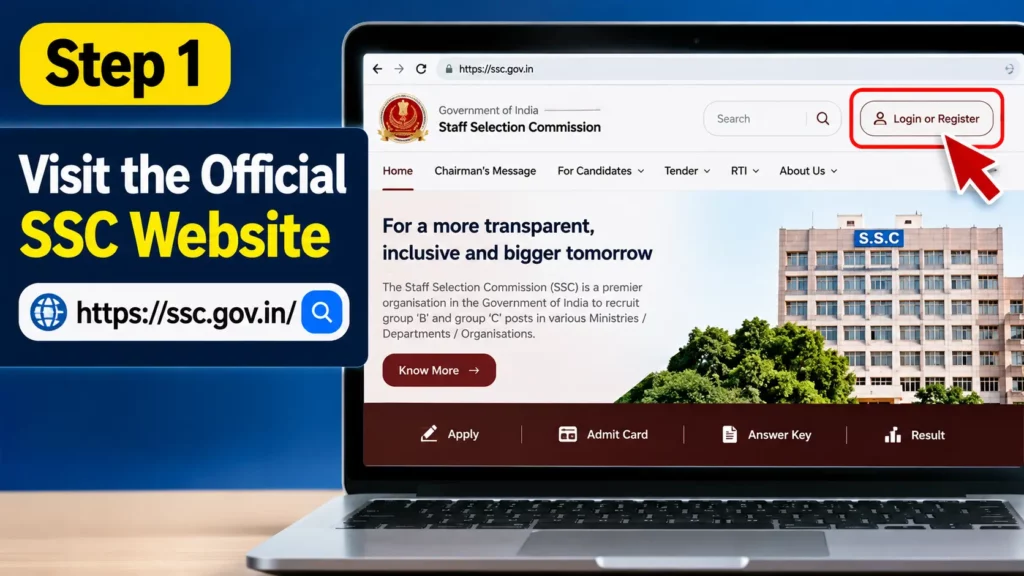
Step 1: Visit the Official Website
Open the official Staff Selection Commission website at https://ssc.gov.in/ using your mobile phone or computer.
Step 2: Click on Login
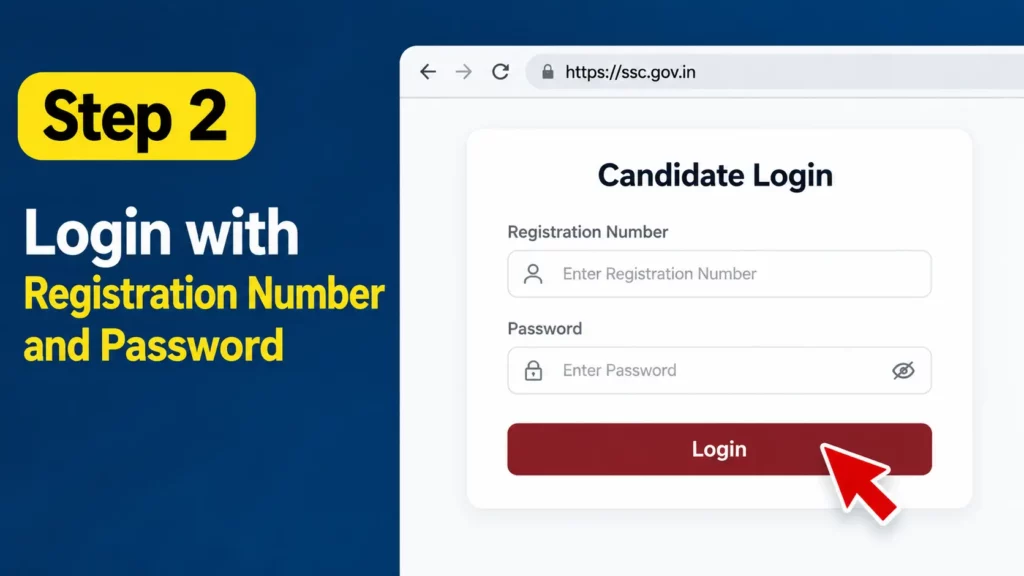
On the homepage, find the login option and open the candidate login section.
Step 3: Enter Login Details
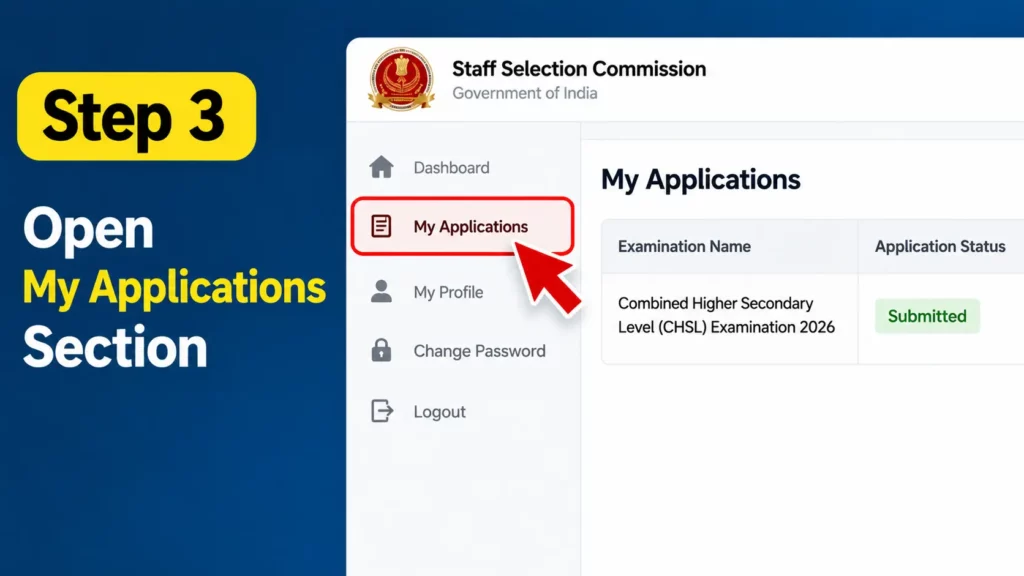
Enter your Registration Number and Password. Complete any required verification and log in to your SSC account.
Step 4: Open the SSC CHSL Application
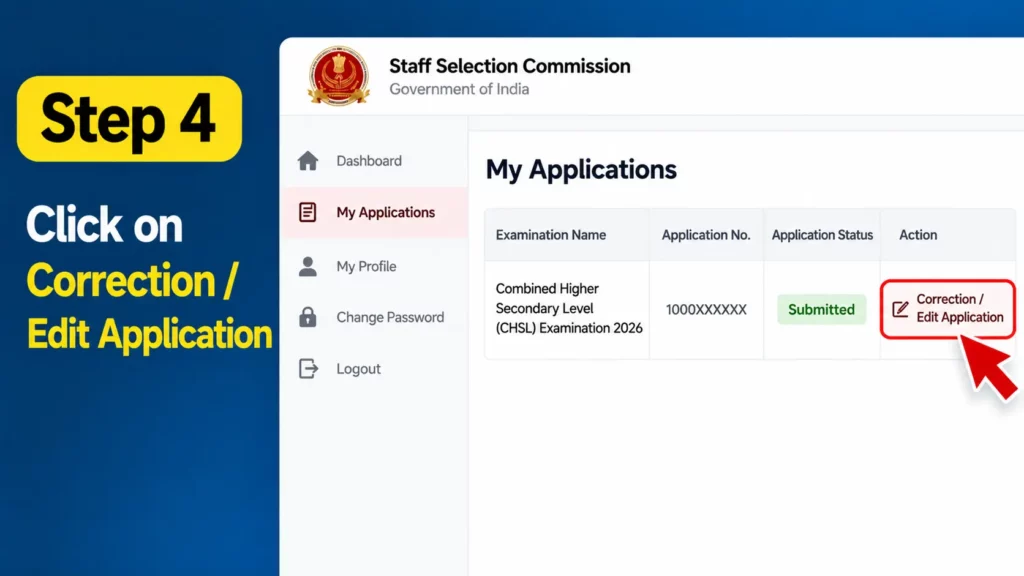
After logging in, navigate to your submitted application or the relevant examination section. Look for the correction option available for SSC CHSL 2026 during the correction window.
Step 5: Edit the Application Form
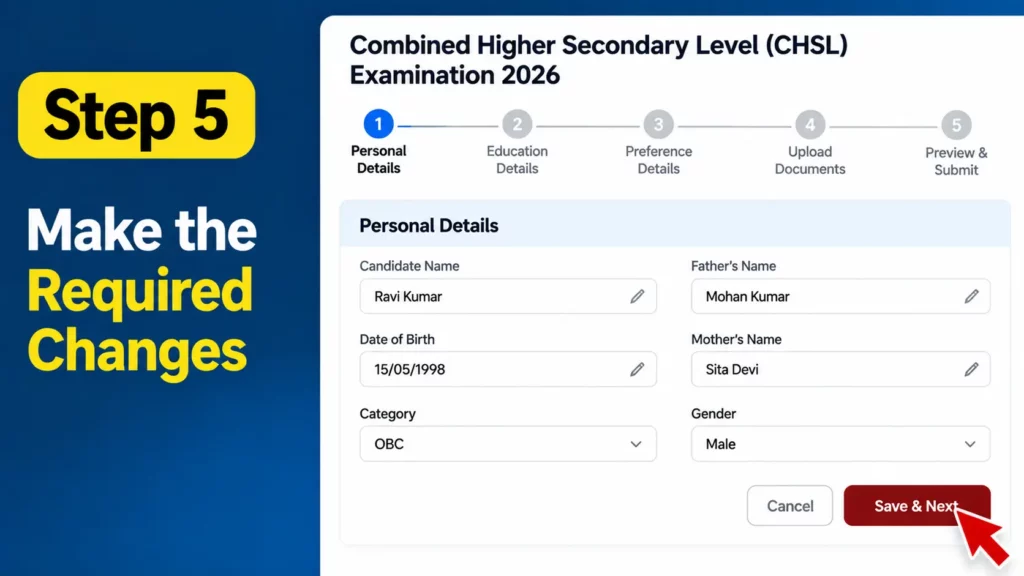
Open the correction facility and carefully review the information that SSC permits you to modify. Make the necessary changes according to the official correction rules.
Step 6: Review the Details
Before submitting the corrected application, check your personal information, educational details, category, and other editable fields. Not every field may be available for correction.
Step 7: Pay the Correction Fee, If Applicable
If SSC requires a correction fee, complete the payment according to the official instructions.
Step 8: Submit the Corrected Form
Submit the corrected application form and save or print the confirmation page for future reference.
Is There a Direct Link for ssc chsl correction window 2026?
No separate direct correction link should be expected. Candidates need to visit the official SSC website and log in to their accounts to access the correction facility, if available.
Always use the official website instead of relying on unofficial links or third-party websites requesting your login credentials.
SSC CHSL Correction Window 2026: Details You Can Correct
During the SSC CHSL Correction Window 2026, candidates should check which details can be edited in their submitted application form. The changes allowed will depend on SSC’s official correction rules. Before making any changes, review the available fields carefully to avoid further mistakes.
SSC CHSL Correction Window 2026: Is There Any Correction Fee?
Candidates should check the official notification to confirm whether a correction fee is applicable. If SSC requires a fee, pay it through the official website and keep the payment receipt for future reference. The applicable fee and payment rules should be verified before submitting the corrected form.
SSC CHSL Correction Window 2026: Check These Details Before Submitting
Before submitting the corrected application form, check all the changes carefully. Make sure your name, date of birth, category, educational details, and other editable information are correct wherever applicable. After final submission, save the confirmation page or corrected application copy for future use.
SSC CHSL Correction Window 2026: What to Do If the Edit Option Is Missing?
If you cannot find the correction option after logging in, first check whether the correction window is open and review the instructions issued by SSC. Make sure you are viewing the correct examination application. If the option is still unavailable during the announced period, contact SSC using the official support details listed on its website.
Important Instructions for Candidates about ssc chsl correction window 2026
- The correction facility is available only during the period specified by SSC.
- Candidates must use their registered login credentials.
- Only the details permitted under SSC’s correction rules can be changed.
- Check the applicable correction fee before submitting the form.
- Save a copy of the corrected application and payment receipt, if applicable.
- Verify the final correction schedule and instructions on the official SSC website.
Conclusion
The SSC CHSL 2026 Application Form Correction Window is scheduled to open on 14 October 2026. Candidates who need to correct their application details should visit https://ssc.gov.in/, log in using their Registration Number and Password, and access the correction facility from their account. Since no separate direct correction link is expected, candidates should follow the official portal and notification for the latest instructions.
FAQs
1. When will the SSC CHSL 2026 Correction Window open?
The correction window is scheduled to open on 14 October 2026. Candidates should verify the date through the official SSC notification.
2. How can I correct my SSC CHSL 2026 application form?
Visit the official SSC website, log in to your account, and use the available correction option.
3. Is a separate direct link available for SSC CHSL correction?
Candidates should access the correction facility through the official SSC website after logging in.
4. Which website is used for SSC CHSL form correction?
The official website is https://ssc.gov.in/.
5. What login details are required?
Candidates generally need their Registration Number and Password to access their SSC account.
6. Can I correct my SSC CHSL form on a mobile phone?
Yes, you can access the official website using a mobile browser, provided the correction facility is available.
7. Can I change my category during the correction window?
It depends on the fields and changes permitted under the official SSC correction rules.
8. Is a correction fee applicable?
SSC may charge a correction fee according to the applicable notification. Check the official instructions before submitting changes.
9. What is the last date for SSC CHSL 2026 form correction?
Check the official SSC notification for the confirmed closing date of the correction window.
10. What should I do after submitting the corrected form?
Save or print the corrected application confirmation and payment receipt, if applicable, for future reference.
