The Railway Recruitment Boards (RRB) have activated the RRB Section Controller Official Mock Test 2026 link under CEN No. 03/2026. Candidates preparing for the Section Controller examination can now access the official mock test through the online assessment portal.
The official mock test allows candidates to become familiar with the computer-based test (CBT) interface, understand question navigation and practise using the available examination controls. Candidates should attempt this mock test before appearing for the actual examination.
RRB Section Controller Mock Test 2026: Overview
| Details | Information |
|---|---|
| Recruitment Authority | Railway Recruitment Boards (RRB) |
| Post Name | Section Controller |
| Recruitment Year | 2026 |
| CEN Number | 03/2026 |
| Mock Test | Official Mock Test |
| Mock Test Status | Link Available |
| Examination Mode | Computer-Based Test (CBT) |
| Admit Card | Check the concerned RRB website for updates |
| Category | Mock Test / Admit Card |
| Official Mock Test Link | Available Below |
RRB Section Controller Admit Card 2026 to Be Released Today
Candidates are advised to check the concerned Railway Recruitment Board’s official website for the RRB Section Controller Admit Card 2026. If the admit card is scheduled for release today, candidates should regularly check the official portal for the download link and related examination instructions.
The admit card contains important examination information, including the candidate’s details, examination date, shift and examination centre information, as applicable. Candidates should download their admit cards as soon as the link becomes available and carefully verify all the details printed on them.
Important: The admit card release date should be confirmed through an official RRB notice. Candidates should not consider the admit card released until the official download facility is active.
RRB Section Controller Official Mock Test 2026 Link
The official mock test for RRB Section Controller Recruitment 2026 is available through the online assessment portal.
Candidates can use the direct link below to open the mock test page. Read the on-screen instructions carefully before proceeding.
Important Links
| Link Description | Direct Link |
|---|---|
| RRB Section Controller Official Mock Test 2026 | Click Here to Attempt Mock Test |
| RRB Official Website | Click Here |
How to Attempt RRB Section Controller Official Mock Test 2026
Follow the steps below to start and attempt the RRB Section Controller Official Mock Test 2026.
- Open the Mock Test Link: Click the official mock test link provided in the Important Links section. Wait for the assessment portal to load completely.
- Read the Instructions: After opening the link, read all the instructions displayed on the screen carefully. Understand the rules for answering questions, saving responses, marking questions for review and submitting the test.
- Choose Your Language: Select your preferred examination language from the available language options, such as English or Hindi, if provided.
- Accept the Declaration: Read the declaration or consent statement displayed on the screen. Tick the consent checkbox or click the appropriate button to confirm that you have read and understood the instructions.
- Start the Mock Test: Click the available button, such as I Agree, Proceed, or Start Test, depending on the portal’s interface.
- Attempt the Questions: Once the test begins, read each question and select the correct option by clicking the round button next to your answer.
- Save and Move Forward: Click Save & Next to save your answer and proceed to the next question.
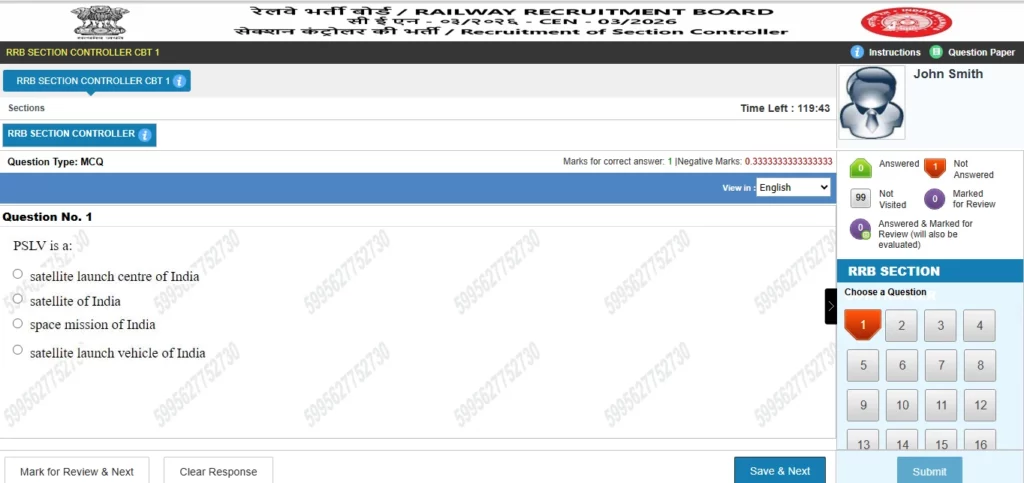
- Skip Questions if Needed: If you are unsure of an answer, use the Question Palette on the right side of the screen to move to another question. You can return to the skipped question later.
- Mark Questions for Review: If you want to check a question again, click Mark for Review & Next and continue with the test.
- Submit the Test: After attempting the questions, review your responses and click Submit. If a confirmation message appears, follow the instructions to complete the submission.
Note: The exact wording of the language, consent and start buttons may vary. Follow the options displayed on the official mock test portal.
RRB Section Controller Official Mock Test 2026: How to Attempt, Skip Questions and Submit the Test
The RRB Section Controller Official Mock Test 2026 helps candidates understand the computer-based test (CBT) interface. Candidates can practise answering questions, skipping questions, marking questions for review and submitting the test by following the steps below.
1. How to Answer a Question
Each question appears with multiple-choice options.
- Read the question carefully.
- Click the round button next to your chosen answer.
- Click Save & Next to save your response and move to the next question.
- Repeat the process for the remaining questions.
2. How to Skip a Question
If you do not know the answer or want to solve a question later, you can move to another question.
- Click the next question number in the Question Palette on the right side of the screen.
- Return to the skipped question later by clicking its question number.
- If a separate Skip button is available on the portal, you can use it as instructed.
In the provided screenshot, a separate Skip button is not visible. You can use the Question Palette to navigate directly to another question.
3. How to Mark a Question for Review
If you want to check a question again before submitting the test:
- Select an answer if you wish.
- Click Mark for Review & Next.
- Continue with the next question.
- Return to the marked question using the Question Palette.
Review-marked questions should be checked before final submission.
4. How to Change or Clear an Answer
- Change an answer: Open the question again and select another option.
- Clear an answer: Click Clear Response if you want to remove your selected option.
- Save an answer: Click Save & Next to save your response and continue.
5. Meaning of the Question Palette Status
| Status | Meaning |
|---|---|
| Answered | The question has been answered. |
| Not Answered | The question has been visited but not answered. |
| Not Visited | The question has not been opened. |
| Marked for Review | The question has been marked for later review. |
| Answered & Marked for Review | The question has an answer and is marked for review. |
Follow the on-screen instructions to understand the exact status indicators used in the mock test.
6. How to Submit the Mock Test
- Attempt the questions you can solve.
- Check unanswered and review-marked questions using the Question Palette.
- Check the remaining time displayed at the top of the screen.
- Click Submit when you are ready to finish.
- If a confirmation message appears, read it carefully and confirm submission as instructed.
Important: Do not wait until the final seconds to submit the test. The timer may run out, and the portal may automatically submit the test according to its rules.
Benefits of the Official Mock Test
The official mock test can help candidates understand the online examination interface before the actual CBT.
- Familiarity with CBT: Understand how questions and answer options appear on the screen.
- Question navigation: Practise moving between questions using the available controls.
- Time management: Develop a strategy for attempting questions efficiently.
- Reduced exam anxiety: Become more comfortable with the online test environment.
- Technical familiarity: Understand the basic functions available during the mock test.
Candidates should remember that the official mock test is primarily intended to familiarise them with the examination interface. It does not guarantee that the same questions will appear in the actual examination.
Mixed Questions Practice for RRB Section Controller Exam 2026
Along with the official mock test, candidates should practise mixed questions from the subjects prescribed in the official examination syllabus.
Regular practice can help candidates improve their accuracy, manage their time and identify areas that need additional preparation. Candidates should also review the official notification and follow the examination instructions issued by their respective RRB.
Frequently Asked Questions (FAQs)
1. Is the RRB Section Controller Official Mock Test 2026 available?
Yes, the official mock test link is available through the online assessment portal provided in this article.
2. What is the CEN number for RRB Section Controller Recruitment 2026?
The recruitment is associated with CEN No. 03/2026.
3. Where can I attempt the official mock test?
Candidates can access the official mock test through the direct link provided in the Important Links table.
4. Is the RRB Section Controller mock test official?
Yes, the provided link is the designated online assessment portal for the official mock test.
5. When will the RRB Section Controller Admit Card 2026 be released?
Candidates should confirm the release date through the latest official notice issued by their concerned RRB.
6. How can I download the RRB Section Controller Admit Card 2026?
Visit the concerned RRB’s official website, open the admit card link when activated and follow the instructions to download it.
7. What is the purpose of the official mock test?
It helps candidates become familiar with the computer-based examination interface and its controls.
8. Can the mock test questions appear in the actual examination?
There is no guarantee that the same questions will appear in the actual examination.
9. What should I do if the mock test link does not open?
Check your internet connection, refresh the page or try again using an updated browser.
10. Should candidates practise mixed questions after attempting the mock test?
Yes, candidates should continue practising relevant questions and revising the prescribed syllabus.