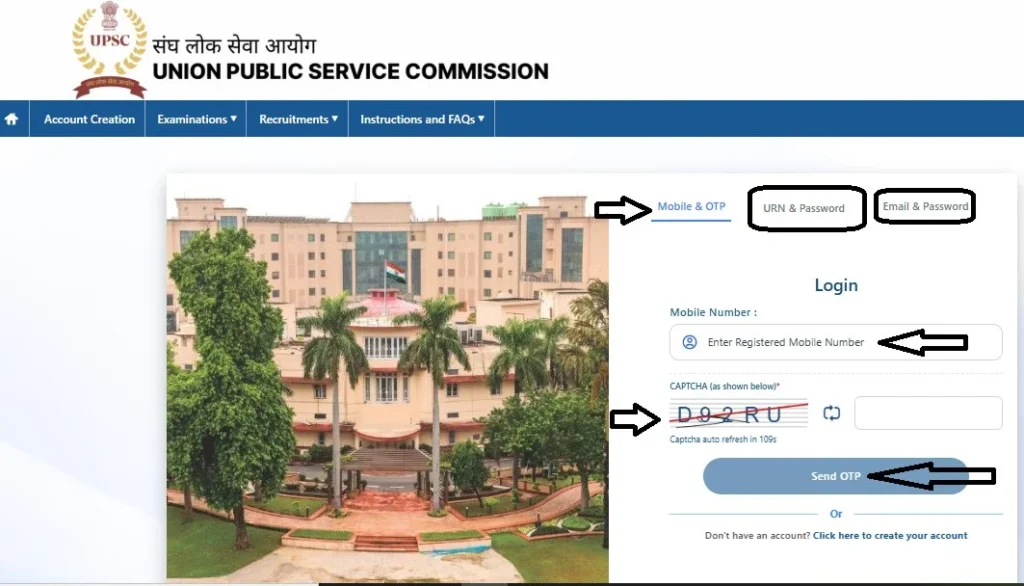
UPSC IFoS Mains Admit Card 2026 :- The UPSC IFoS Mains Admit Card 2026 has been released today! Candidates appearing for the Indian Forest Service (Main) Examination 2026 can now download their e-Admit Card online through the official website of the Union Public Service Commission. Candidates can check their admit card download link, examination centre, reporting time and other important details in this article.
The UPSC IFoS Mains Examination 2026 is scheduled to be conducted from 22 November to 29 November 2026 in two shifts. Candidates should download their hall tickets and verify all details before appearing for the examination.
UPSC IFoS Mains Admit Card 2026 – Overview
| Particulars | Details |
|---|---|
| Exam Authority | Union Public Service Commission |
| Examination | Indian Forest Service (Mains) 2026 |
| Article Category | Admit Card |
| Admit Card Status | Awaited |
| Exam Mode | Offline |
| Exam Start Date | 22 November 2026 |
| Exam Last Date | 29 November 2026 |
| Exam Timing | Two Shifts |
| Admit Card Mode | Online |
| Official Website | upsc.gov.in |
When Will UPSC IFoS Mains Admit Card 2026 Be Released?
The commission has already published the examination timetable, allowing candidates to check their subject-wise examination dates. The e-Admit Card download link will be available on the official portal. Candidates will need their registration details or roll number to access their hall tickets.
UPSC IFoS Mains Exam Date 2026 – Complete Schedule
According to the official examination timetable, the IFoS Mains Examination will take place over eight calendar days.
| Date & Day | Morning Session (9 AM–12 PM) | Afternoon Session (2:30–5:30 PM) |
|---|---|---|
| 22 Nov 2026 (Sunday) | General English | General Knowledge |
| 23 Nov 2026 (Monday) | Mathematics-I / Zoology-I | Mathematics-II / Zoology-II |
| 24 Nov 2026 (Tuesday) | Gazetted Holiday | No Examination |
| 25 Nov 2026 (Wednesday) | Civil / Chemical / Mechanical Engineering-I | Civil / Chemical / Mechanical Engineering-II |
| 26 Nov 2026 (Thursday) | Agricultural Engineering / Animal Husbandry / Botany / Chemistry-I | Corresponding Paper-II |
| 27 Nov 2026 (Friday) | Agriculture-I / Forestry-I | Agriculture-II / Forestry-II |
| 28 Nov 2026 (Saturday) | Physics-I | Physics-II |
| 29 Nov 2026 (Sunday) | Geology-I / Statistics-I | Geology-II / Statistics-II |
How to Download UPSC IFoS Mains Admit Card 2026 ?
After the official download link becomes active, candidates can follow these steps to download their hall tickets:
- Visit the official UPSC website at https://upsc.gov.in/.
- Open the Admit Cards section on the homepage.
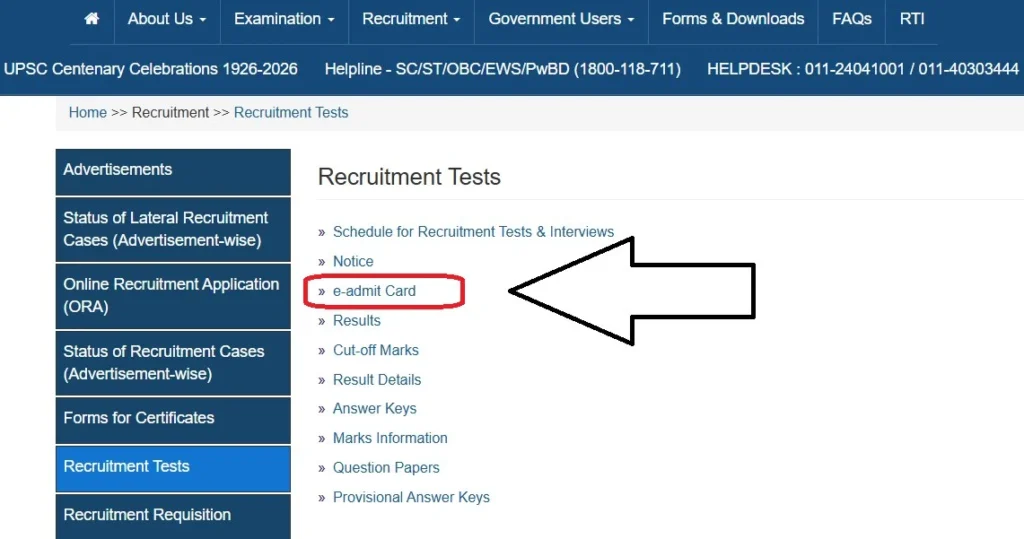
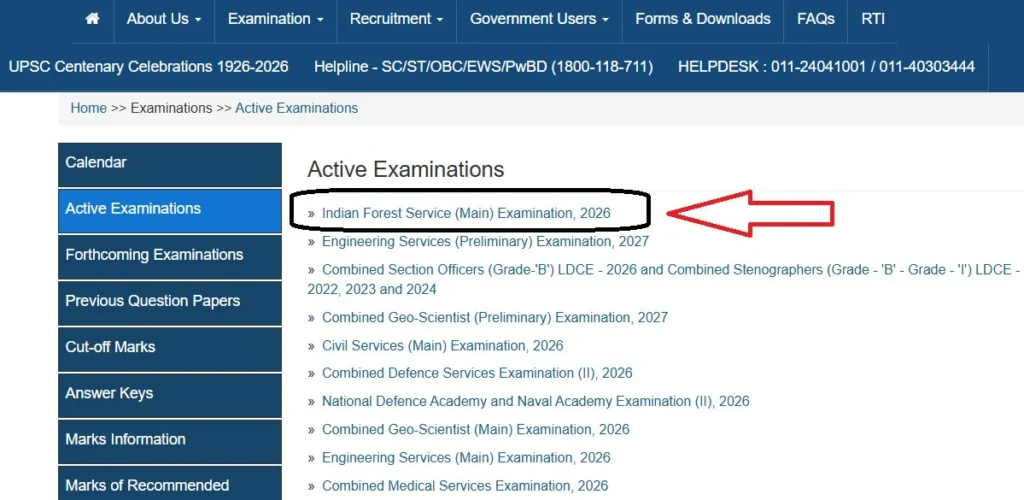
- Find the Indian Forest Service (Main) Examination 2026 link.
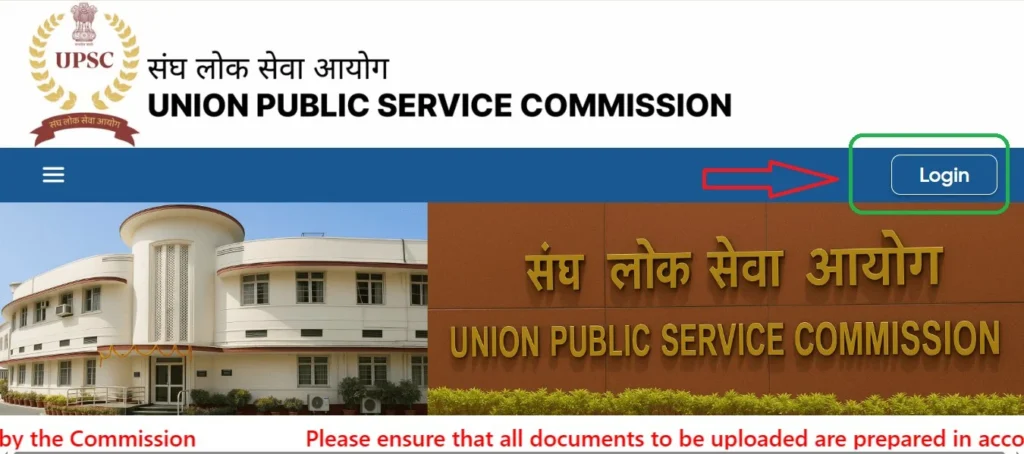
- Click on the e-Admit Card download option.
- Select the required login method.
- Enter your Registration ID or Roll Number and Date of Birth, as applicable.
- Complete the verification process.
- Submit the details to view your admit card.
- Download the PDF and take a clear printout.
Important Instructions for UPSC IFoS Mains Examination Day
Candidates should make the necessary arrangements before their examination dates to avoid last-minute difficulties.
- Check Your Examination Centre: Locate the examination venue in advance and confirm its complete address.
- Arrange Transportation: Plan your journey and allow sufficient time for reaching the examination centre.
- Keep Documents Ready: Carry the printed e-Admit Card and original valid photo identity proof.
- Check Both Sessions: Carefully verify the morning and afternoon examination timings applicable to your subjects.
- Avoid Prohibited Items: Do not carry mobile phones, smartwatches, Bluetooth devices or other prohibited electronic gadgets into the examination hall.
- Follow Official Guidelines: Read and follow all instructions mentioned on the e-Admit Card.
Candidates should download their admit cards as soon as the official link becomes available and keep a clear printed copy for examination purposes.
Important Details to Verify on UPSC IFoS Mains Admit Card
After downloading the e-Admit Card, candidates should carefully verify all the information printed on it. Any discrepancy should be reported to UPSC through the official communication channels before the examination.
- Candidate Information: Verify your name, roll number, registration number, photograph and signature.
- Examination Centre: Check the complete examination centre address and make travel arrangements in advance.
- Examination Schedule: Confirm your subject-wise paper dates and session timings.
- Reporting Time: Check the reporting instructions and reach the examination centre well before the examination begins.
- Identity Proof: Keep an original valid photo ID ready along with the printed admit card.
- Examination Instructions: Read the guidelines regarding permitted and prohibited items before entering the examination hall.
UPSC IFoS Mains Admit Card 2026 – Important Links
| Description | Link |
|---|---|
| Download Mains Admit Card | Admit Card Link |
| UPSC IFoS Mains Time Table Official Notice | Download PDF |
| UPSC Official Website | https://upsc.gov.in/ |
| All updates | Notifyhere |
Frequently Asked Questions (FAQs)
Q1. Is UPSC IFoS Mains Admit Card 2026 released?
The official release of the admit card has not been confirmed as of 12 November 2026.
Q2. When will the UPSC IFoS Mains Exam 2026 begin?
The examination is scheduled to begin on 22 November 2026.
Q3. What is the last date of the IFoS Mains Examination?
The last examination date is 29 November 2026.
Q4. Where can I download the UPSC IFoS Mains Hall Ticket?
Candidates can download it from the official UPSC website.
Q5. What login details are required to download the admit card?
Candidates may use their Registration ID or Roll Number and Date of Birth, as applicable.
Q6. What are the IFoS Mains examination timings?
The morning session is from 9:00 AM to 12:00 Noon, and the afternoon session is from 2:30 PM to 5:30 PM.
Q7. Is there a holiday during the IFoS Mains examination?
Yes, 24 November 2026 is a gazetted holiday.
Q8. Is a printed admit card compulsory for the examination?
Candidates should carry a printed copy of their e-Admit Card to the examination centre.
Q9. What documents should I carry with my admit card?
Candidates should carry an original valid photo identity proof.
Q10. What should I do if there is an error on my admit card?
Contact UPSC through its official communication channels to report the discrepancy.