
The Indian Air Force has released the IAF Agniveer Vayu Admit Card 2026 for Intake 02/2027, and candidates can now download it from the official CASB recruitment portal using their registered login before the online exam on 22-23 September 2026. This hall ticket carries your exact exam center, reporting time, and roll number — details the earlier exam city slip did not include.
Every eligible candidate who applied between 6-26 July 2026 must download, verify, and print this admit card, since entry to the exam hall is not allowed without it. Below is the direct download process, the mandatory dress code, the documents checklist, and answers to every doubt candidates commonly have about this admit card.
[nh_timeline]
Important Details
| Detail | Information |
|---|---|
| Recruitment | IAF Agniveer Vayu Intake 02/2027 |
| Admit Card Release Date | 20.09.2026 |
| Online Exam Dates | 22-23 September 2026 |
| Official Download Portals | iafrecruitment.edcil.co.in, agnipathvayu.cdac.in |
| Application Window (for reference) | 06 July 2026 – 26 July 2026 |
| Age Limit | 17.5 – 22 years (DOB: 01 July 2005 to 01 January 2010) |
Agniveer Airforce Admit Card 2026 Latest Update
The Indian Air Force has released the Agniveer Vayu Intake 02/2027 Admit Card 2026. Candidates can download their hall ticket through the official Candidate Login using their registered credentials. The Phase-I online examination is scheduled for 22 and 23 September 2026, so candidates appearing on 22 September should download and check their admit card immediately.
The admit card contains important details including the exam date, shift, reporting time, examination centre and exam-day instructions. Candidates should take a clear printout of the admit card and carry the required documents to the examination centre.
How to Download the IAF Agniveer Vayu Admit Card 2026: Step-by-Step
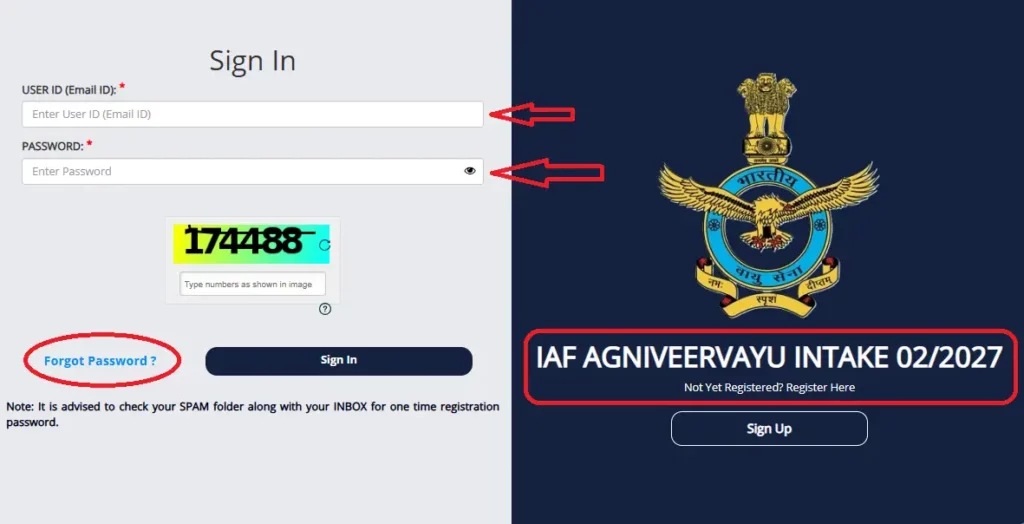
Step 1: Visit the official portal
Go to iafrecruitment.edcil.co.in (or agnipathvayu.cdac.in). Avoid third-party or WhatsApp-forwarded links.
Step 2: Click “Candidate Login”
Find and click the Candidate Login option on the homepage.
Step 3: Enter your credentials
Use your registered email ID (User ID) and password created during application.
Step 4: Complete the captcha
Enter the captcha code exactly as shown.
Step 5: Click “Sign In”
This opens your candidate dashboard.
Step 6: Click “Download Admit Card”
Your admit card will open as a PDF — download and save it.
Step 7: Verify every detail
Check your name, photo, signature, roll number, exam date, reporting time, and exam center address carefully.
Step 8: Print a clear copy
Take a sharp A4 printout — avoid folded, blurry, or low-ink prints.
Forgot Password or User ID: How to Reset IAF Agniveer Vayu Login
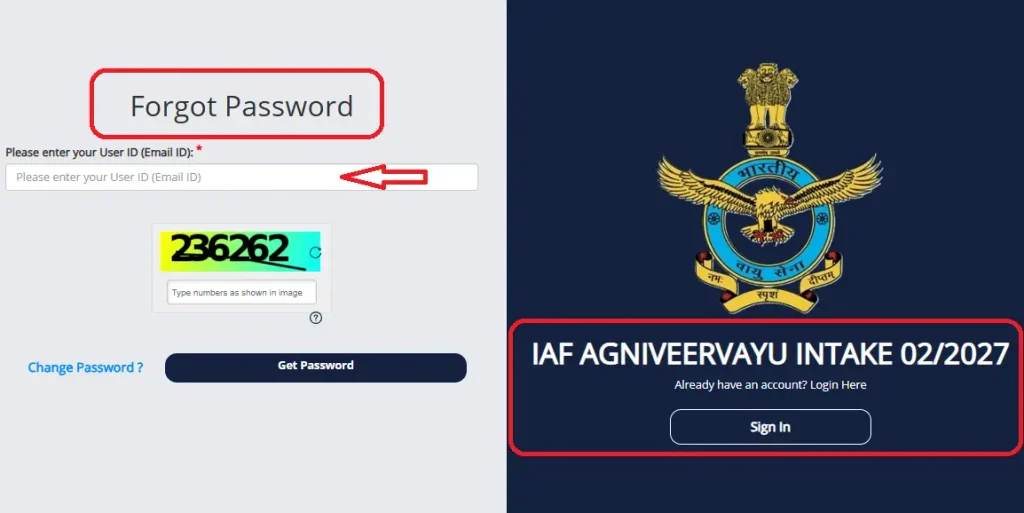
If you’re searching “IAF Agniveer Vayu forgot password,” “iafrecruitment.edcil.co.in login not working,” or “CASB admit card forgot user ID,” here’s the exact recovery process:
Step 1: Go to the Candidate Login page
Visit iafrecruitment.edcil.co.in and click “Candidate Login.”
Step 2: Click “Forgot Password” or “Forgot User ID”
Both links are usually placed just below the login form, right under the Sign In button.
Step 3: Enter your registered details
For a forgotten password, enter your registered email ID (User ID) and date of birth. For a forgotten User ID, enter your registered mobile number or other application details as prompted.
Step 4: Verify via OTP or registered email
An OTP or password reset link will be sent to your registered mobile number or email ID. Use it to set a new password.
Step 5: Log in again with the new password
Once reset, return to the Candidate Login page and sign in normally to access your IAF Agniveer Vayu Admit Card 2026.
What to Wear: IAF Agniveer Vayu Exam Dress Code
Based on the standard dress code followed in previous Agniveer Vayu and Airmen recruitment cycles (confirm against your specific admit card instructions once released, as exact wording can vary slightly):
Also visit : SSC CPO 2026 Notification Out: 1,871 SI Vacancies, Apply Now
- Wear light, simple clothing — half-sleeve or full-sleeve shirts/t-shirts are generally allowed; avoid clothes with big buttons, badges, brooches, or heavy embroidery.
- Avoid metallic items entirely — no belts with metal buckles, no metallic buttons, no jewellery (rings, bracelets, chains, earrings, nose pins) as these can trigger metal detector checks and cause delays.
- Footwear: Prefer simple slippers/sandals over heavy shoes with metal eyelets or buckles, as some centers restrict shoes with metal parts through frisking.
- Hairstyle/accessories: Keep hair simple; avoid large hair clips, pins with metal, or headgear (except religious headgear, which may require separate verification at the center).
- No electronic devices: Mobile phones, smartwatches, calculators, Bluetooth devices, or any electronic gadget are strictly prohibited inside the exam hall.
- No wallets/bags with metal zippers or items: Keep your bag minimal — most centers do not allow bags inside the hall at all.
Important: Always follow the exact dress code and prohibited items list printed on your own admit card — it is the final authority, and instructions can be updated for each intake.
Documents Checklist for Exam Day
| Document | Why It’s Required |
|---|---|
| Printed Admit Card / Hall Ticket | Mandatory entry pass — no entry without it |
| One Valid Original Photo ID (Aadhaar / PAN / Passport / Driving Licence / School-College ID) | To verify your identity against the admit card |
| Passport-size Photographs (same as uploaded during application) | May be required for verification/signature at the center |
| Printed Copy of Application Form (recommended) | Useful backup in case of any discrepancy on the day |
| Pen (Black/Blue Ball Point) | For signatures and declaration forms at the center |
What Candidates Should Do Now
- Download your admit card immediately once live — don’t wait until the last day.
- Cross-check your exam center address and reporting time carefully; plan your travel a day in advance if the center is far from home.
- Follow the dress code strictly to avoid delays or issues during frisking.
- Reach the exam center at least 60-90 minutes before reporting time.
- Do not carry any prohibited electronic item — even accidentally carrying a phone can lead to disqualification.
Common Doubts & Problems: IAF Agniveer Vayu Admit Card 2026
This section covers almost everything a candidate might search or worry about regarding the IAF Agniveer Vayu Admit Card 2026 — read through before exam day so nothing catches you off guard.
“IAF Agniveer Vayu Admit Card 2026 not showing / not available” — what to do ?
If the download option is not visible on iafrecruitment.edcil.co.in or agnipathvayu.cdac.in, it usually means it hasn’t been activated yet for your specific exam date/slot. Admit cards are typically released in batches 48-72 hours before each exam day, not all at once for every candidate. Keep checking the candidate login every few hours closer to your exam date.
Name, photo, or signature mismatch on the Agniveer Vayu hall ticket
If your name is spelled incorrectly, your photo looks unclear, or your signature doesn’t match, do not ignore it. Contact the helpdesk (iafrecruitment@edcil.co.in / 9513 253 233) immediately with your registration details and a screenshot of the issue. Minor spelling mismatches are usually resolved by carrying your original ID proof, which will match your application data — but always report it in advance rather than assuming it will be fine.
Lost or accidentally deleted admit card PDF
Since the admit card is available through your Candidate Login on the official CASB portal, you can simply log in again with your registered email and password and re-download it anytime before the exam — there’s no separate “reissue” process needed.
Exam center is far from my city — can it be changed ?
Exam centers are allotted by the Indian Air Force based on your application details and city preference, and this is not something candidates can change after the admit card is issued. If there is a genuine, exceptional issue, only the official helpdesk can advise — there is no self-service center-change option on the portal.
Can I use a mobile screenshot of the admit card instead of a printout ?
No. A physical printed copy of the IAF Agniveer Vayu Admit Card is mandatory for entry. A screenshot or PDF shown on a phone screen is not accepted, since mobile phones themselves are banned inside the exam hall.
Do female candidates have different dress code rules ?
The core rules (no metallic jewellery, no heavy embroidery, simple footwear, no electronic devices) apply to all candidates regardless of gender. Bindis, bangles, and other metallic accessories should also be avoided to prevent delays during security checks.
What if I reach the exam center late ?
Most exam centers close the reporting gate strictly at the time mentioned on the admit card, often well before the exam start time. Reaching late can mean losing your chance to appear for that slot entirely — always plan to arrive at least 60-90 minutes early.
Is there a helpline if my admit card link isn’t working at all
Yes — if the portal itself is down or not loading for you, try again after some time (traffic is usually very high right after release) or contact the helpdesk directly at iafrecruitment@edcil.co.in or 9513 253 233.
Important Links
| Description | Link |
|---|---|
| Admit Card Download (Candidate Login) | Direct Link |
| Official Website | Click Here |
| Helpdesk Email | iafrecruitment@edcil.co.in |
| Helpdesk Phone | 9513 253 233 |
| For Any Educational Updates Join Telegram Channel | NotifyHere |
| For Any Educational Updates On Whatsapp | Join Whatsapp Channel |
Frequently Asked Questions
Is the IAF Agniveer Vayu Admit Card 2026 out now ?
Yes, the admit card for Intake 02/2027 has been released and is available for download via candidate login.
How can I download the IAF Agniveer Vayu Admit Card 2026 ?
Log in at iafrecruitment.edcil.co.in or agnipathvayu.cdac.in with your registered email and password, then click the admit card download option.
What is the dress code for the Agniveer Vayu exam ?
Simple, light clothing with no metallic items, jewellery, or heavy footwear. Follow the exact instructions on your own admit card, as this can be updated per intake.
What documents should I carry to the exam center ?
Printed admit card, one valid original photo ID, passport-size photographs, and a pen. Full checklist is above.
What is the exam date for Agniveer Vayu Intake 02/2027 ?
The online test (Phase I) is scheduled for 22-23 September 2026.
Can I carry my mobile phone to the exam hall ?
No. Mobile phones and all electronic devices are strictly banned inside the exam hall.
What happens if my admit card details are wrong ?
Contact the helpdesk immediately at iafrecruitment@edcil.co.in or 9513 253 233 before exam day.
How early should I reach the exam center ?
At least 60-90 minutes before the reporting time mentioned on your admit card.
Is the exam city slip the same as the admit card ?
No — the exam city slip only confirmed your city earlier; the admit card has your exact center, roll number, and reporting time.
Where can I get help if I face issues downloading the admit card ?
Email iafrecruitment@edcil.co.in or call 9513 253 233 for official support.
What happens after the Agniveer Vayu online exam (Phase I) ?
Candidates who clear Phase I (Online Test) are shortlisted for Phase II, which includes the Physical Fitness Test (PFT) and Adaptability Tests, followed by Phase III (Medical Examination) for those who clear Phase II.
Will I get a separate result or scorecard after the online exam ?
Yes, IAF typically releases a Phase I result/shortlist separately after the online exam, listing candidates qualified for Phase II. This is different from the admit card and will be announced on the same official portal.
Can I download the admit card from a cyber café or someone else’s device ?
Yes, as long as you have your own registered email ID and password, you can log in and download the admit card from any device with internet access — it is not device-locked.
What should I do immediately after the exam is over ?
Keep a copy of your admit card and any acknowledgment/exit slip given at the center safely, as you may need them again for Phase II and Phase III document verification.
